When Studio AI launched, the goal was pretty simple: help organizations turn long-form video into short-form content without it becoming a part-time job.
Because for a lot of teams, that’s exactly what content repurposing turns into.
The livestream ends Sunday afternoon. Or the graduation ceremony wraps up. Or the keynote session finishes at 4:30 PM and somebody suddenly realizes they still need clips for social by tomorrow morning.
Then the real workflow begins.
Downloading recordings. Re-uploading files. Waiting for processing. Hunting for the right moment. Trimming clips. Rewriting captions. Exporting again. Uploading again. Somewhere around two days later, a 47-second vertical video finally gets posted to Instagram or TikTok — assuming somebody had time to finish it.
That part matters more than people admit.
And honestly, that’s the reason many churches, schools, theaters, performance venues, and conference teams struggle to repurpose content consistently. Not because they don’t understand the value of short-form content. Everybody understands the value now. The problem is the operational overhead attached to it.
The workflow gets exhausting.
Especially for smaller teams already juggling volunteers, student workers, seasonal staff, faculty requests, production schedules, speaker changes, rehearsals, sponsor slides, or the thousand tiny fires that seem to happen before every live event.
Since launch, Studio AI has changed quite a bit. Some of it you’d notice immediately. Some of it works quietly in the background, removing the small friction points that used to eat entire afternoons.
But the bigger shift is harder to summarize as a single feature.
Studio AI is starting to feel less like a tool and more like a connected workflow — a place where livestreaming, editing, refinement, and publishing can all happen in one place.
That matters more than it sounds like it should.
Editable and Downloadable Transcripts
Transcripts are useful right up until they’re wrong.
Which happens constantly.
Names get mangled. Scripture references turn into nonsense. Guest speaker names come out phonetically cursed. Somebody says “Resi” and suddenly the transcript thinks they’re talking about “recipe.” A commencement speech references “Sumner Academy” and the transcript decides it heard “summer economy.” It happens.
So one of the bigger additions since launch was editable transcripts directly inside Studio AI.
Users can now fix mistakes, adjust formatting, clean up wording, and refine transcripts without exporting everything into another platform first. And the transcript follows video playback in real time, which sounds minor until you’ve spent twenty-five minutes scrubbing through a 73-minute conference keynote trying to find one quote the marketing team suddenly needs for LinkedIn.
Then it becomes extremely important.
Transcripts can also be downloaded or copied directly out of Studio AI. A sermon moment can become a devotional post. A superintendent quote can become an email campaign. A keynote line can turn into social copy before attendees even leave the building.
Less rebuilding. Less hunting around for files.
And fewer browser tabs open at 11:40 PM.
Speaker Tracking
Vertical video quietly changed audience expectations around framing.
Five years ago, slightly awkward crops were mostly acceptable. Now people notice immediately when a speaker drifts halfway out of frame during a Reel, TikTok, or YouTube Short. Attention spans on those platforms are unforgiving in a way that’s honestly a little unreasonable.
But it’s real.
Speaker Tracking was added to help solve that problem.
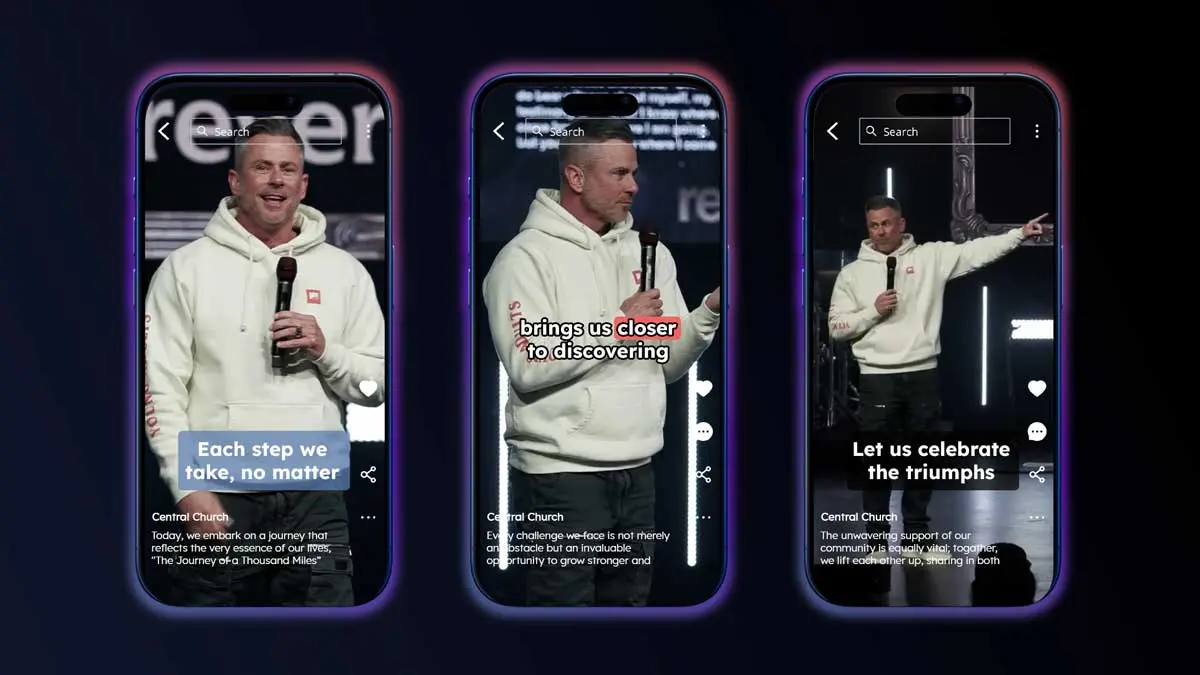
Studio AI now uses AI-assisted Speaker Tracking to keep the speaker in frame during vertical video creation, using smooth, natural motion designed to feel steady instead of hyper-reactive. You’ve probably seen automated tracking tools that snap around wildly every time somebody moves six inches across a stage.
This is intentionally calmer.
The goal wasn’t to create a robot director or pretend software perfectly understands every stage transition, camera cut, or multi-person panel discussion. Those expectations get unrealistic very quickly. Instead, Speaker Tracking was designed to feel more like a human operator making predictable adjustments to keep attention focused where it belongs.
For sermons, keynote speakers, graduation speeches, training sessions, announcements, performers between songs, and other single-speaker moments, that’s usually the better experience anyway.
Post to Instagram
This one removed an absurd amount of friction.
Before this update, publishing clips to Instagram still required the exact workflow Studio AI was trying to simplify:
Export the clip. Download the file. Upload it somewhere else. Post manually.
Again. And again. And again.
Now Studio AI supports direct publishing to Instagram from inside the platform.
Create the clip. Refine it. Publish it.
Done.
No exports. No local downloads. No mysterious folder filled with filenames like “FINAL_final_vertical_USETHISONE_v4.mp4.”
Every production team has one. Usually several.
And while this sounds like a convenience feature — which it absolutely is — it also changes something operationally. Content gets posted faster when fewer steps exist between “finished” and “published.” Teams follow through more consistently. The momentum from a live event doesn’t evaporate while somebody waits on another platform to finish processing a file.
Which, in practice, is often the difference between clips that actually get published and clips that quietly disappear into a downloads folder forever.
A less dramatic outcome than anyone wants to admit.
Studio AI Is Now Available for Social Only Customers
Studio AI used to be more limited in who could access it.
Now, Social Only customers can start a trial and use the platform as well.
Which makes sense.
A lot of organizations are building social-first content strategies long before they build out full on-demand libraries. Schools want graduation highlights and athletic clips. Conference teams need speaker moments online while the event is still happening. Performance venues want social content before the audience even leaves the parking lot.
Sometimes the livestream is the destination.
Sometimes social media is.
Usually it’s both.
Opening Studio AI access to Social Only customers means smaller organizations and growing production teams can use the same connected workflow without stitching together five separate tools and a shared Dropbox folder held together mostly by optimism.
From Livestream to Published — Without Leaving the Platform
Some things are worth doing slowly.
Writing a sermon. Planning a keynote. Rehearsing a performance. Editing something carefully because nuance actually matters.
But repurposing content usually isn’t one of them.
The longer the gap between the live event and the published clip, the less likely the clip gets posted at all. That’s just operational reality for teams already balancing production schedules, volunteers, student workers, sponsor deliverables, faculty requests, event logistics, rehearsals, and everything else attached to live production.
Studio AI is increasingly built around closing that gap.
And for most teams, that’s the actual difference between content that consistently gets published and content that quietly disappears into a downloads folder by Tuesday afternoon.
Want to see how the workflow works in practice? Schedule a demo and see how Resi and Studio AI take you from livestream to published content without leaving the platform.